Huawei MatePad Pro Max (2026): Máy tính bảng siêu mỏng và nhẹ
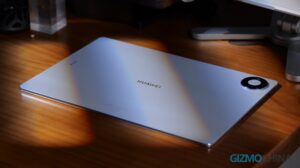
Huawei ra mắt MatePad Pro Max (2026) với thiết kế cực kỳ mỏng nhẹ, chỉ 4,7mm dày và nặng 499 gram, trái ngược với xu hướng các máy tính bảng 13 inch khác ngày càng nặng hơn. Sản phẩm hứa hẹn thay thế laptop nhưng câu hỏi đặt ra là liệu việc giảm trọng lượng có ảnh hưởng đến hiệu năng và tính năng "Pro" hay không.
Intro We’ve seen plenty of tablets that promise to replace your laptop. They’re loaded with power, sure, but they also weigh a ton. So when Huawei showed up in 2026 with the MatePad Pro Max and took the exact opposite approach—going ridiculously thin and light—I was curious. At just 4.7mm thick and 499 grams, this thing is practically anorexic compared to other 13‑inch flagships that keep bulking up on specs. But does cutting so much weight mean cutting too much “Pro” performance? After using it daily for a month, here’s the unfiltered truth. Design The moment you pick it up, your brain does a double take. 499 grams—that’s nearly 200 grams less than the same‑size iPad Pro, and even lighter than a hardcover art book. At 4.7mm, you can literally pinch it between two fingers and wander around the house like it’s a fancy notepad. Slip it into your bag, and you’ll genuinely forget it’s there. Huawei calls this the “Cloud Falcon Architecture,” and it’s earned TÜV Rheinland’s ultra‑thin bend‑resistance certification—I gave it a good twist, and it stayed impressively rigid. My review unit is the blue “Flow Back” version, and yes, the 3.5mm headphone jack is gone, but the trade‑off is a six‑speaker HUAWEI SOUND setup that actually delivers: decent bass, clear vocals, and a genuinely enjoyable experience for movies or podcasts, easily beating most tablets in this class. Display Then you turn on the display. That 13.2‑inch flexible OLED panel has no notch, no punch‑hole, no distractions—just pure screen. With a claimed 94% screen‑to‑body ratio, videos truly fill your view, and the 3K resolution (3000 x 2000) plus 144Hz refresh rate makes scrolling and gaming butter‑smooth. There are two variants: the standard glossy OLED with punchy colours and 2,000,000:1 contrast, great for HDR, and the PaperMatte Edition I tested, which uses nano‑etched glass to cut glare and add a paper‑like drag for the stylus. That version is slightly less punchy for pure media, but it’s a lifesaver if you work near windows or take lots of handwritten notes. One caveat: the 1600‑nit peak brightness only fires up for specific HDR scenes in small windows—day‑to‑day, it’s fine by a window or outdoors, but don’t expect smartphone‑like visibility under blazing sun; that’s just the physics of big screens. Productivity Productivity is where things get interesting. Huawei touts this as a productivity beast, but honestly, the real wins for me weren’t the PC‑level WPS suite—it was the multi‑window, stylus, and keyboard combo I actually used every day. You can run three apps side by side: I’d have a browser for research, HUAWEI Notes for jotting, and the gallery for reference images, all switching without lag. It’s not mind‑blowing, but it’s rock‑solid. However, plug in an external monitor and the magic fades; it’s simple mirroring, not true desktop expansion, so you can’t drag windows to a second screen like a laptop. That stings if you wanted a dual‑monitor workflow. The M‑Pencil Pro (sold separately) pairs beautifully, especially with the PaperMatte screen where the etched glass gives real paper‑like friction. The GoPaint app isn’t a throwaway—brush strokes have natural ink bleed, and the smart colour palette pulls suggestions from your drawing, making it way more than “good enough” for sketching, storyboarding, or visual notes. But the surprise hit was the AI handwriting beautification in HUAWEI Notes—my handwriting is barely legible, and toggling it on transforms my scrawl into neat, natural‑looking script without turning it into robotic print. That alone made me take more notes. The Glide Keyboard has short key travel but snappy feedback, fine for banging out a 2,000‑word article in a pinch. The fatal flaw? No cantilever hinge. The tablet lies flat on the keyboard base—no floating angle like a Surface or…