Acer Nitro 65 gây ấn tượng với giá cạnh tranh và hiệu năng mạnh mẽ
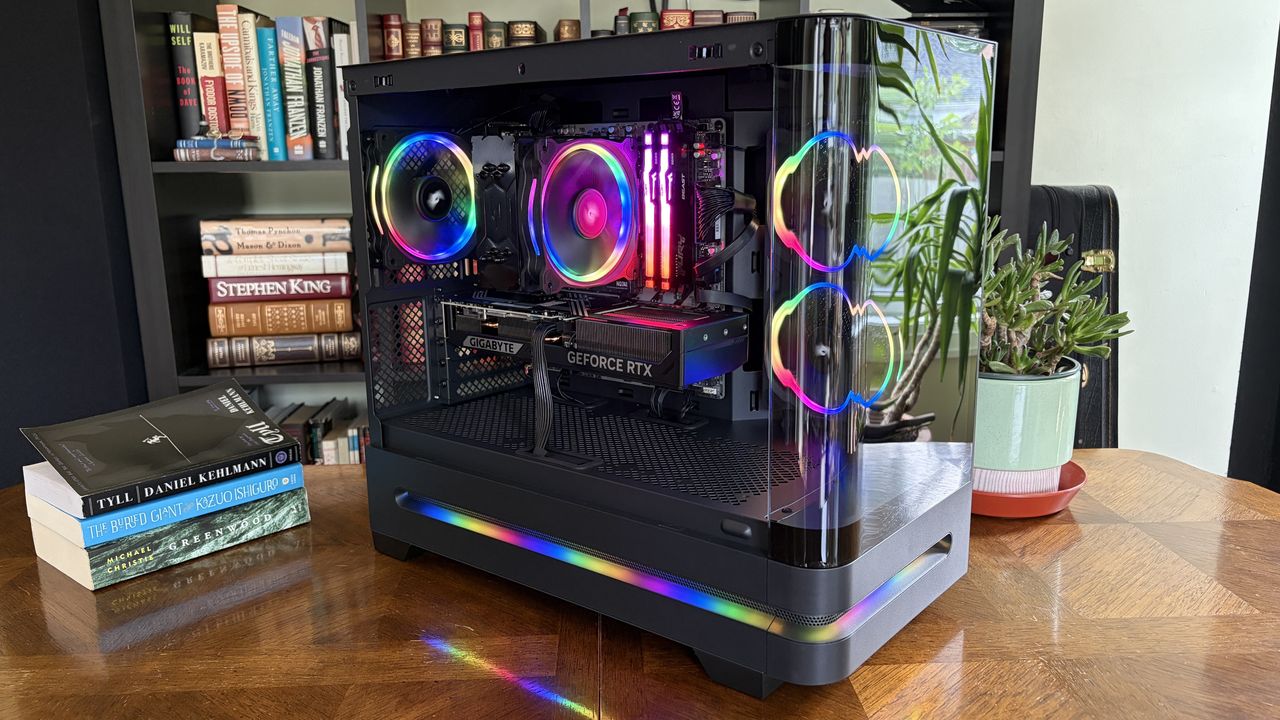
Máy tính chơi game được xây dựng sẵn Acer Nitro 65 có thiết kế sạch sẽ, giá cạnh tranh và hiệu năng tốt. Sản phẩm sử dụng các linh kiện thông thường có thể nâng cấp hoặc thay thế dễ dàng, phù hợp với thời kỳ thiếu hụt RAM và linh kiện khác trên thị trường.
Acer's Nitro 65 arrives at a time when the PC market is undergoing major stress caused by RAM, storage, and other component shortages. Nevertheless, the Nitro 65's pricing remains reasonable, its performance is spot on, the case is far better than I expected, and it uses (mostly) regular parts that you can upgrade or replace yourself without much effort. I've been using the PC for a couple of weeks, and while it's mainly been a positive experience, there are a couple of quirks that you need to know about before buying. Acer sent Windows Central a review unit on loan for testing. It had no input, nor saw the contents of this review, prior to publication. How much does the Acer Nitro 65 cost? The Nitro 65's curved case is a definite perk for this build. (Image credit: Future) The Acer Nitro 65 model I'm reviewing, with Ryzen 9 9900X CPU, RTX 5070 GPU, 32GB of RAM, and 1TB SSD, costs $2,304.99 regularly at Best Buy , although it seems to enjoy frequent sales that drop it closer to $2,100 or less. I'm always curious to see how that compares to building your own system, so I went ahead and put something together using the same (or as similar as possible) components. You're looking at a similar cost compared to building your own system. I used a $150 HYTE X50 case (because it's awesome) , a $120 motherboard, and left about $200 to $300 for a 1TB SSD. That comes out to $350 to $450 on top of the $1,611 cost at PCPartPicker . Add some RGB case fans and other small accessories, and you're looking at a similar cost compared to building your own system. If you like the look of the PC but don't need quite as much performance, models with an AMD Ryzen 7 8700F CPU and either an NVIDIA RTX 5060 or an AMD Radeon 9060 XT range from $1,100 to $1,600 , depending on available discounts. Here's a closer look at the specs in the unit I'm reviewing. Acer Nitro 65 CPU AMD Ryzen 9 9900X GPU NVIDIA RTX 5070 (12GB, Gigabyte WindForce) RAM 32GB DDR5 (Kingston Fury Beast) Storage 1TB M.2 PCIe 4.0 NVMe (Lexar NQ7A1) Motherboard Gigabyte B850M C PSU 850W 80+ Gold (non-modular) Wireless Wi-Fi 7, Bluetooth 5.4 Dimensions 18.4 (W) x 9.6 (D) x 17 (H) inches Warranty 1 year Is the Acer Nitro 65 built well with good cable management? A look at the back of the PC with the panel removed, revealing cable management. (Image credit: Future) Acer is definitely making money on the Nitro 65, but as I laid out above, the margin isn't as big as some might expect. So, where are the corners being cut to make up the difference? The first thing that stands out to me is the no-name PSU . It's non-modular, making it harder to upgrade, and it's tough to judge what sort of quality it is. Acer lists it as 850W 80+ Gold , which just means it's fairly energy efficient and has plenty of power for the installed hardware and for future upgrades. Its actual durability remains questionable. If I were buying this PC, I'd definitely replace the PSU with something else before the one-year warranty ran out. The other off-brand piece is the Nitro-branded CPU air cooler. But as we'll see, it does a decent job of keeping the 9900X cool under load. If you prefer liquid cooling, the 35L case can easily accommodate the extra hardware. A look at the components inside the Nitro 65. (Image credit: Future) The good news is that the PC is otherwise well put together and uses standard components that you can buy yourself for upgrades and repairs. No wacky motherboard designs. No off-brand GPUs. No sketchy memory. Acer uses Kingston Fury Beast DDR5-6000 RGB RAM here in a dual-channel config, the RTX 5070 is a standard Gigabyte WindForce option, and the M.2 PCIe 4.0 NVMe SSD is from Lexar . Now, there's no guarantee that these exact same components will be used in your model, but I did run some benchmarks to see how the specific parts in my review unit perform. More on that below. A case for RGB lovers ... with plenty of snazzy glass The Nitro 65's rounded glass looks great when the RGB is on. Future An…